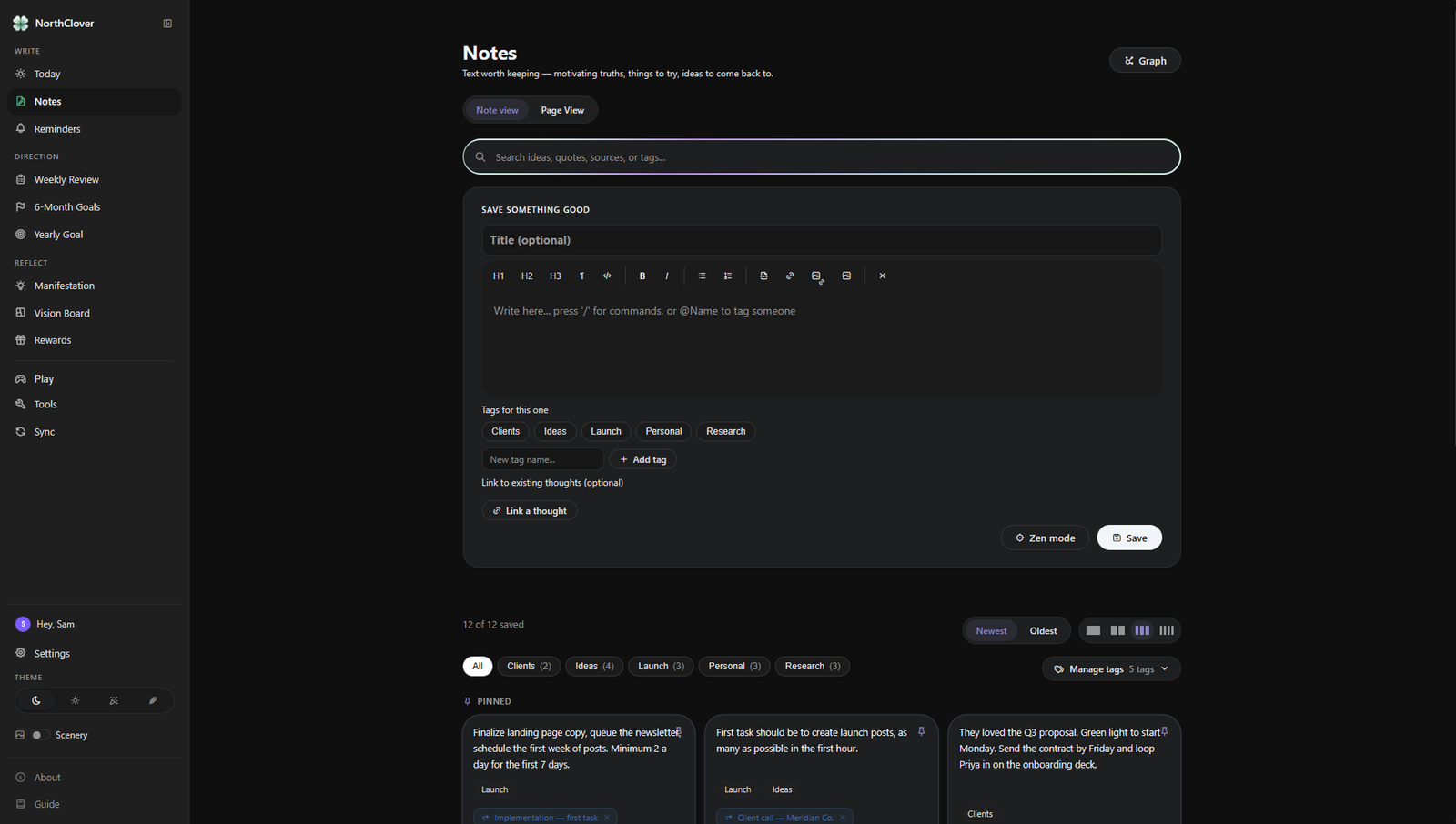
The actual NorthClover desktop appTry it yourself ↗
▦ Windows + Android⌂ Local-first data⇄ Direct Wi-Fi
sync↥ Files up to 2 GB
YOU DIDN’T START FOR THE CHECKBOXES.
You had something in mind.
A business. A book. A healthier life. Something you wanted to learn,
make, or change.
Then the everyday work got scattered.
A NOTE, SOMEWHEREThat idea I didn’t want to lose.
Which app did I put it in?
THE BIGGER PICTUREStart something of my own.
Still on the list. Somewhere.
ANOTHER REMINDERCome back to this tomorrow.
Tomorrow got busy, too.
ON MY PHONEThe thought I had on the way home.
Not on my computer.
THIS WEEKLots done. But did it matter?
No time to stop and notice.
THE SYSTEM ITSELFFix the dashboard. Again.
One more thing to maintain.
Back together.
Your thoughts, your work, and where you want to go.
CaptureDoReflectAdjustContinue
Being busy isn’t the same as feeling connected.
NorthClover brings the pieces of personal productivity into one
environment.
A WORKSPACE WITH A NATURAL RHYTHM
We studied why smart people give up on productivity apps. Then we
built an
app that works with your brain, not against it.
Most productivity apps feel like filling out boring spreadsheets at
work. But your brain isn't a computer database — it needs fast
capture, visual clarity, gentle reminders, and genuine
encouragement.
01 / FIND YOUR FOOTING
Open to today. Not everything.
Some mornings, you need a place to begin. Today gives you room
to write, check in with your energy, and notice what deserves
your attention right now.
Let reminders hold the loose ends. A follow-up,
a date, a small promise to yourself. Keep it close to your day
instead of in another app.
Your past stays within reach. Revisit entries
and notice how things have changed. Use Zen mode when you just
want to write.
Research for a project. A sentence worth keeping. The idea that
arrives halfway through a walk. Notes gives your thinking a home
in the same workspace as your plans.
Connect what belongs together. Link notes, use
tags, and explore relationships in the graph when you want the
wider context.
Write in your own way. Headings, lists, links,
and rich writing tools make room for quick captures and deeper
work.
What worked? What got in the way? What deserves another try?
Weekly Review makes space for the questions that disappear when
you’re only looking at the next task.
Notice the pattern. See the week as a whole,
rather than carrying the same unfinished thoughts into Monday.
Make a small adjustment. Your reflection
becomes a reason to approach the next week differently. Do,
review, adjust, continue.
Six months is close enough to imagine and long enough to make
something happen. Give each month a goal, then keep the year’s
larger direction alongside it.
6-Month Goals. Make the next stretch tangible,
one month at a time. Your goals can grow and change with you.
Your Yearly Goal. A place to name what this
year is about. Return to it when you need to choose what gets
your time.
No ads. No account required. Your notes stay on your device. Direct sync
with Windows requires Mobile Pro and the same local Wi-Fi.
DIRECT LOCAL P2P WI-FI SYNC · ZERO CLOUD SERVERS
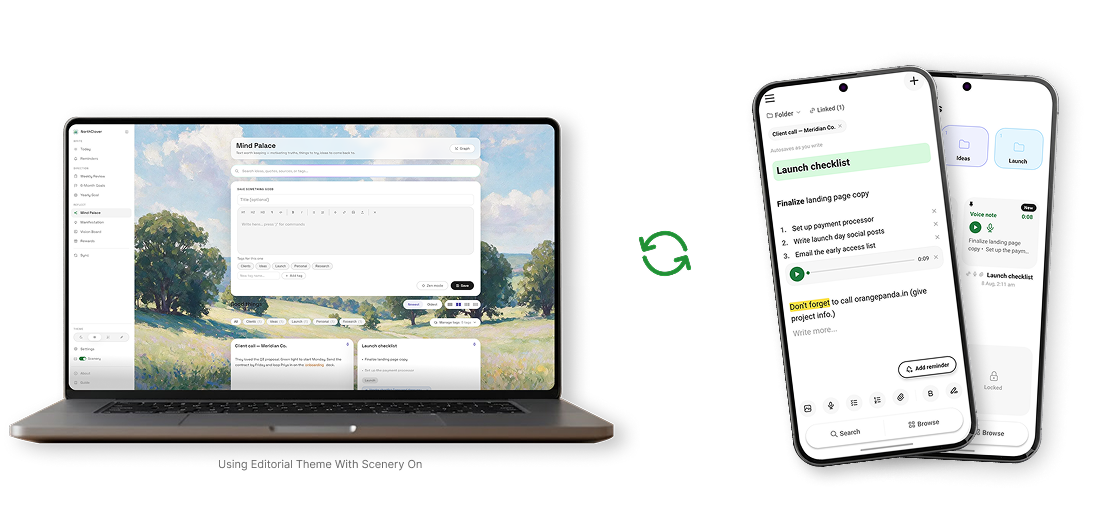
Two devices. Two distinct mindsets. One shared
vault.
You never have to write anything twice. Your phone and computer
share the exact same notes, folders, voice memos, and reminders.
When both devices are on your local home or office Wi-Fi, they sync
peer-to-peer directly — with zero middleman cloud servers and no
cloud storage subscription. Mobile Pro is required for sync.
Same local Wi-Fi required · Mobile Pro required for sync
Notes and reminders are just the beginning. Move documents, images,
videos, and project assets between Windows and Android.
2 GBper file. Room for the big things.
PRIVATE BY DESIGN
Nobody else sees this.
NorthClover is built to protect your privacy at every step.
It runs entirely on your own device — aware of your goals and your
day, without ever collecting them. Windows and Android talk
directly to each other over your own Wi-Fi, so nothing passes
through a cloud server in between.
01
Local-first, because these are your thoughts.
Your productivity data lives on your devices. The experience is
built around your own workspace, not a cloud server at its
center.
02
Your devices talk directly.
Windows and Android communicate over the same local Wi-Fi.
Direct peer-to-peer sync keeps continuity close to home.
03
Leave anytime, with everything.
NorthClover supports full data export — keep your own backups,
on your own terms.
THE FAMILIAR PATTERN
Clarity shouldn’t need a complex
setup.
We’ve all downloaded the “Ultimate Life OS” template. We’ve all
spent hours linking databases and installing Obsidian plugins.
Here’s what actually happens.
01 / NOTION
Configuration Paralysis in Notion
You open Notion to write a quick reflection, but end up fixing
rollups, styling gallery cards, and reorganizing relations. It
feels like working inside a corporate database.
RESULT: PRODUCTIVITY AS PROCRASTINATION
02 / OBSIDIAN
The Obsidian Plugin Rabbit Hole
45 community plugins, YAML frontmatter errors, broken custom CSS
themes, and a giant graph of disconnected markdown files.
There’s no daily structure or weekly alignment.
RESULT: COMPLEX GRAPH, ZERO EXECUTION
03 / NORTHCLOVER
The NorthClover Sanctuary
A bespoke, handcrafted workspace designed around one purpose:
your true trajectory. Zero setup. Connect your daily energy to
your 6-month goals in five minutes a day.
RESULT: CALM CLARITY, CONSISTENT PROGRESS
And much more — without plugins, setup fatigue, or recurring
subscriptions.
KEY FEATURE / WORKFLOW
Notion
Obsidian
NorthClover
Setup Time
3–15 hours (templates, relations)
5–20 hours (plugins, themes, configs)
0 minutes (Ready out of the box)
Mobile Quick Capture
Slow loading, multi-tap workspace navigation
Opens last vault view; requires quick-note plugin setup
Instant blank note on open + Voice & Attachments
Daily Journal + Energy Score
Manual database properties required
Requires Dataview plugin & frontmatter
Native 1–5 energy score & live metrics
Weekly Strategy & Calibration
Complex page linking required
Manual templates & folders
Dedicated intention & friction-log engine
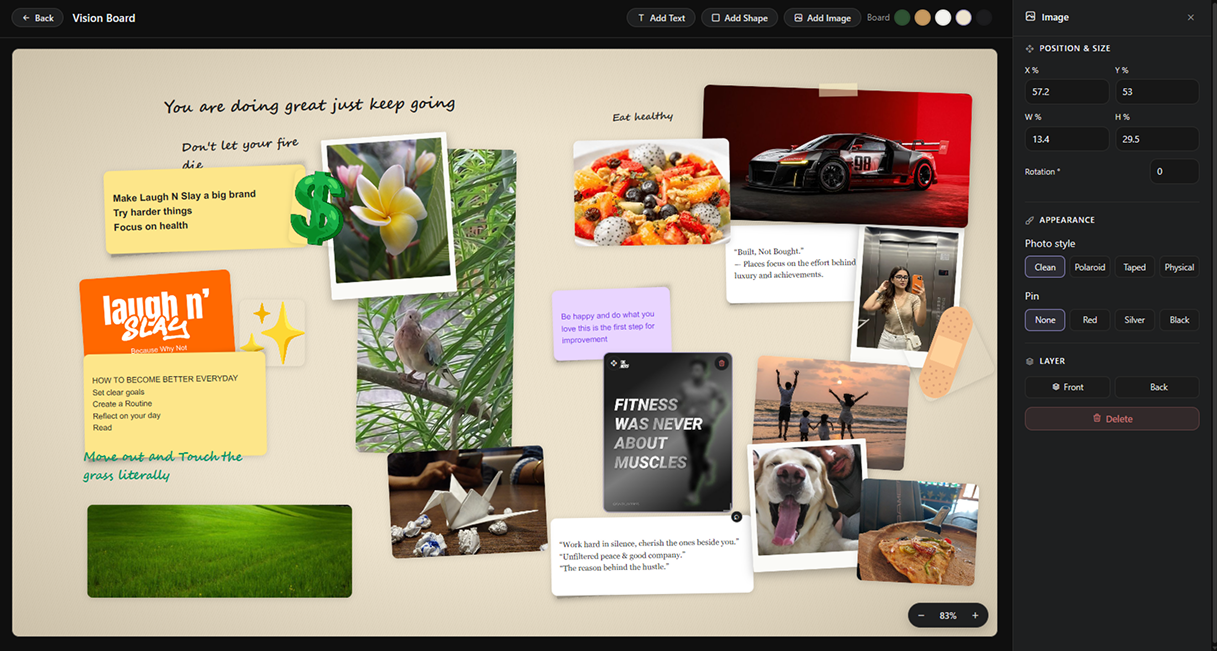
Tactile Vision Board
Rigid gallery cards only
Canvas plugin (technical, wireframe feel)
Organic draggable sticky notes & pushpins
Notes & Force Graph
No network graph representation
Yes (very dense & technical)
Clean linked notes + interactive canvas graph
Data Privacy & Offline
Cloud-hosted, used for product analytics
Local files
100% private, local storage & JSON export
WHAT’S INSIDE
Enough structure. Room to
be yourself.
The full environment, at a glance. Every part has a role in the same
personal rhythm.
✎WRITE & REMEMBER
Today, Notes & Reminders
Daily writing and energy check-ins. Personal notes, research,
links, and ideas. Reminders for the things you don’t want to carry
in your head.
▦PAUSE & CHOOSE
Weekly Review
Step back from the individual day. Notice progress and friction.
Give what happened a chance to influence what comes next.
⚑LOOK AHEAD
6-Month Goals & Yearly Goal
A tangible medium-term horizon and a larger direction for the
year. Keep both within reach of the work you’re doing now.
▧IMAGINE
Manifestation & Vision Board
Words and pictures for what you’re moving toward. Space for
aspirations, intentions, and a future that’s still taking shape.
♔KEEP GOING
Rewards, Challenges & Tools
Choose your own incentives, work toward a challenge, and find
supporting tools in the workspace. Make room for momentum,
achievement, and a break.
⇄TAKE IT WITH YOU
Windows + Android
Local-first productivity across desk and pocket. Direct Wi-Fi
sync, mobile capture, and device-to-device file transfers up to 2
GB.
TAKE YOUR TIME. FIND YOUR FIT.
Start with today. Decide
from there.
Try the full Windows app for 30 days. Desktop and mobile have
separate plans, so it’s clear what you’re choosing.
It’s a personal productivity environment. Notes and daily focus
are part of it, alongside reminders, weekly reflection, six-month
and yearly goals, intentions, vision boards, rewards, and
challenges. The point is keeping those parts of your life
together.
Do I need to build a system or install plugins first?
No plugin ecosystem is required for the core workflow. NorthClover
already provides places for the major rhythms of personal
productivity. You bring your content, goals, thoughts, and
direction.
How does Windows–Android sync work?
Your devices connect directly over the same local Wi-Fi network.
This peer-to-peer connection supports continuity without a central
cloud server as the middleman. Mobile Pro is required for sync.
Can I use NorthClover offline?
NorthClover is local-first, with data on your devices. The Android
app supports offline capture. Device sync needs the direct local
Wi-Fi connection; purchasing, downloading, and other online
services still need internet access.
Can I transfer videos and other large files?
Yes. NorthClover supports transfers of up to 2 GB per file between
Windows and Android. That includes documents, images, videos,
archives, and other project assets.
Does the desktop license include Mobile Pro?
No. Windows and Android plans are separate. Windows offers a
30-day trial, a annual plan, and a lifetime option.
Android has a free option and a separate per-year Mobile Pro
plan.
Can I explore before installing?
Yes.
Open
the live experience
to try the interface and explore its spaces. The sandbox doesn’t
save your changes. The Windows trial lets you try the downloaded
application for 30 days.
Can I export my information?
NorthClover supports data export. Keep your own backups and review
the export options in the app’s guide. Local-first ownership also
means keeping a backup routine that works for you.
Your day. Your direction. Your place to begin.
You bring the life you want to work on. NorthClover gives it a
connected place to grow.
 NorthClover